
General
With the customizable merger, it is possible to merge specific assets according to individual requirements. This is mainly used in order to unite scattered information on specific asset instances in a single representation. This is especially useful when relevant information is coming from multiple data sources.Creating Custom Mergers
Just follow these steps in order to create your own mergers:- Select the two asset types to be merged: “Merge [Asset Type] with [Asset Type]” (e.g., “Merge Server with Server”).
- Select the assets’ properties to be used for merging these two asset types: “when [Property] [Operator] [Property]” (e.g., “when ID equals ID”). By clicking on
+ Add Constraint, further constraints can be added, which can be linked withORorAND. Clicking on the delete icon deletes a specific constraint. - Setting the value for “Target Type (after merging)” defines the resulting asset type after merging two assets (e.g. “Server”).
- In order to deal with missing data (e.g., assets without a “name” attribute), the
Name Propertysection allows to specify further properties that are used asName Propertyfor the resulting (merged) asset, e.g., “datasourceId” or “qbilonID”. - When two assets have different values for one specific property (e.g. different department assignments), the selected
Merge Strategydefines which values is used in such a conflicting case: the oldest value, the newest value or the value originating from a specific data source (e.g. PRTG). In the latter case, users can define a descending order of data sources to be used. In addition, it is possible to select an own merge strategy for specific asset properties (+ Add Merge Strategy).
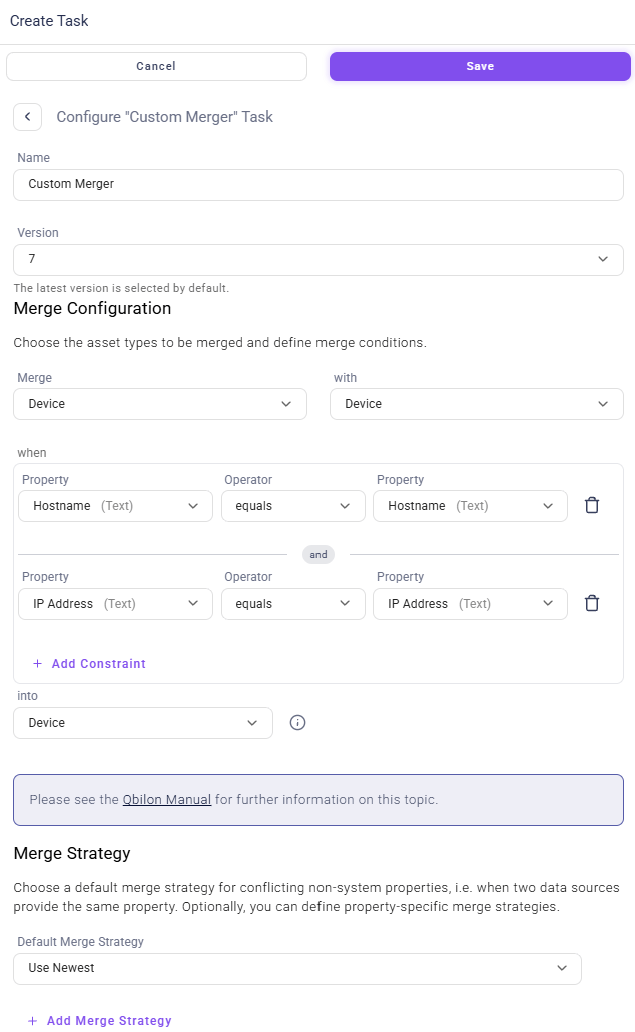
Custom Merger Example
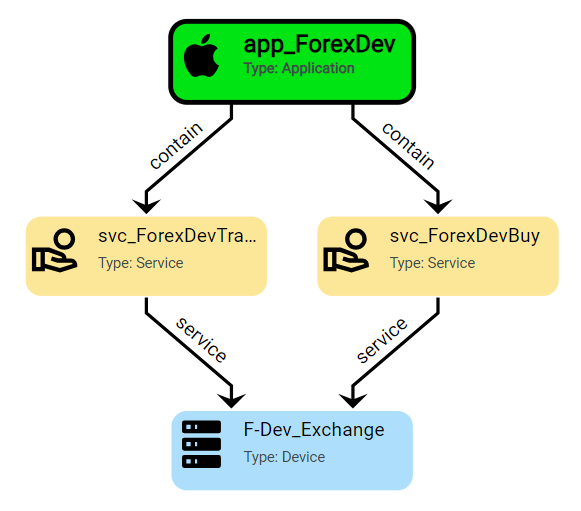
In the following a “before and after example” of a merger process is shown. We intend to merge all “Devices” with the same name. Thus, the configuration is simpler compared to the screenshot above: Now, we only define one merge condition – “Name equals Name” – instead of two. Before running the custom merger, the diagram looks like this including two “Devices” with the same name (blue assets):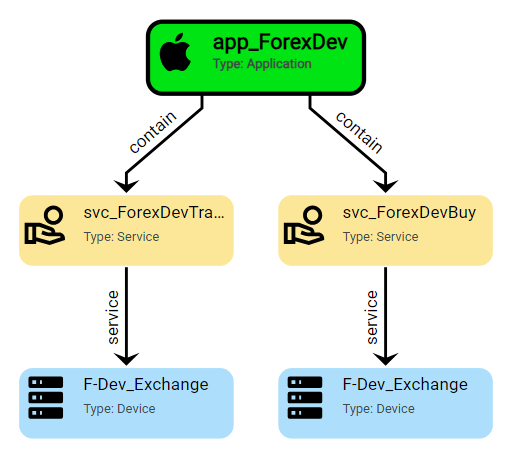
F-Dev_Exchange as they have equal Name properties. The resulting diagram now looks like this:
Known Limitations
Merging fuses multiple assets (along with all their properties) into a single asset. Applying this mechanism to assets that originate from the same data source can result in unintended update behavior. Example A user imports data from data sourceDS1 and merges assets of type A with assets of type B into a new type C . Suppose the custom merger works as intended, processing two assets (one of each asset type) and “producing” 1 asset of type C as a result.
When DS1 is run again, the original assets – one of type A and one of type B – are no longer available for updating because they have previously been merged into a single type C asset.
So for each incoming asset, the original ID is no longer found in Qbilon’s database anymore because the assets have been merged in the meantime. Instead, the pre-processing identifies the asset with ID 1 (and type C) as the “relevant” asset to update for both incoming assets. Technically, this is correct, as both assets contribute to this type C merge result with ID 1.
However, a next step during the pre-processing is to eliminate incoming assets with non-unique (conflicting) IDs in order to avoid non-deterministic results: As a consequence, all assets that have been merged using such a “data source-internal” merger are skipped and will never receive updates.
The following table illustrates how the pre-processing for this example looks like: