
Preface
Linking in Qbilon is one of the possibilities to consolidate data by automatically creating relations between assets from two or more distinct data sources based on the properties that each asset has. This can be useful, for example, to link physical or virtual hardware devices to their respective monitoring counterparts whenever new devices are discovered. The/apiv1/data/link/{taskId} endpoint allows you to programmatically link such data in Qbilon. Currently, this endpoint is considered to be in “beta stage”, which means you can use it, but the data format still might change in the future.
Linking Concept
To better understand this endpoint, we will first explain how linking works from the user’s perspective, and then explain the data format that can be used in this endpoint to control how Qbilon links the data. So how does Linking work in Qbilon? Consider the following case shown in the first figure below, where you have loadedApplication and Server assets from one data source and the Monitoring Devices that monitor those assets from another data source. As you can see in the second figure below, the Monitoring Devices are currently not connected to their respective monitored Application or Server.
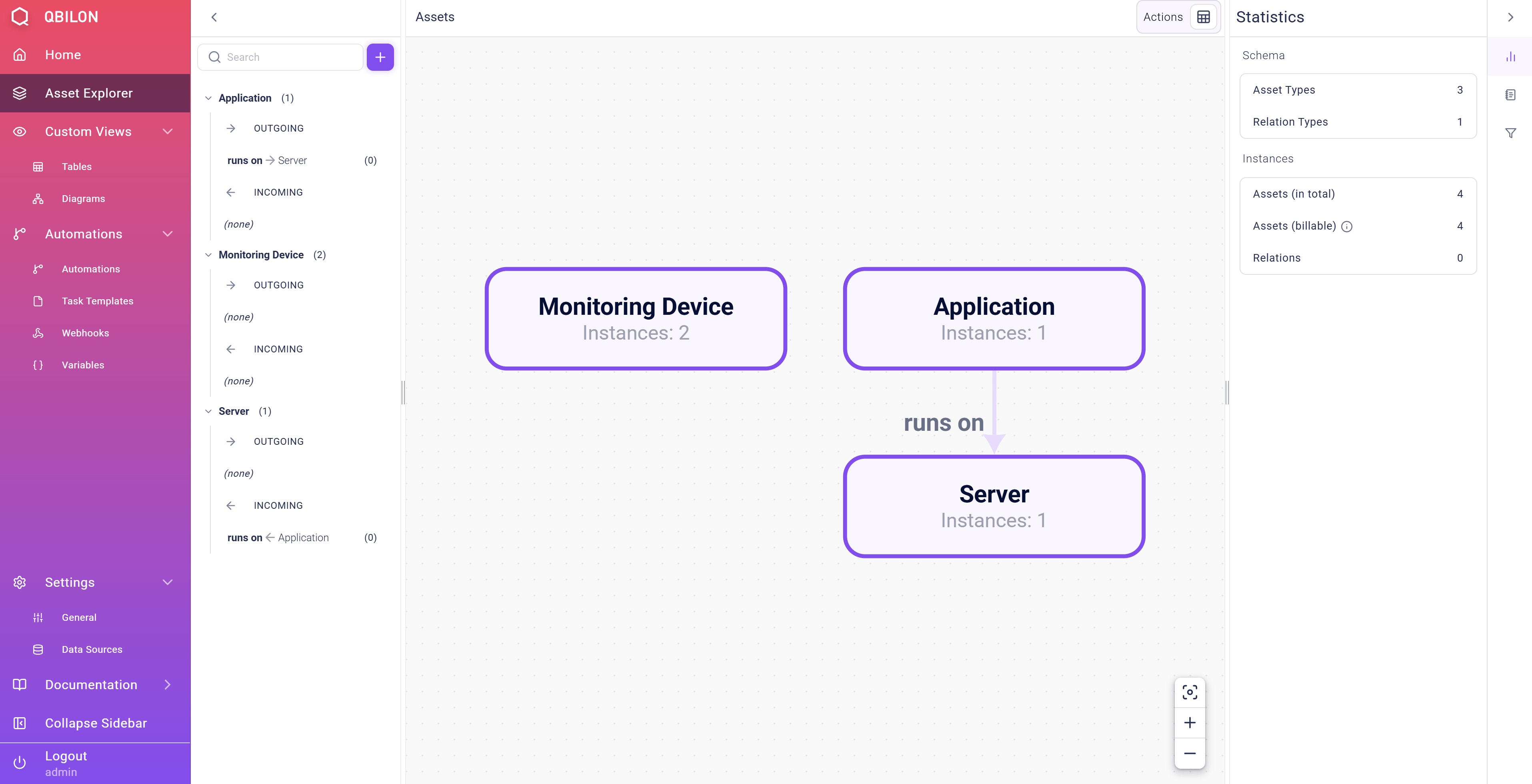
Monitoring Device instance and the specific asset it is monitoring. In order to automatically create those relations between these different types, you would now create a Custom Linker task in Qbilon like this:
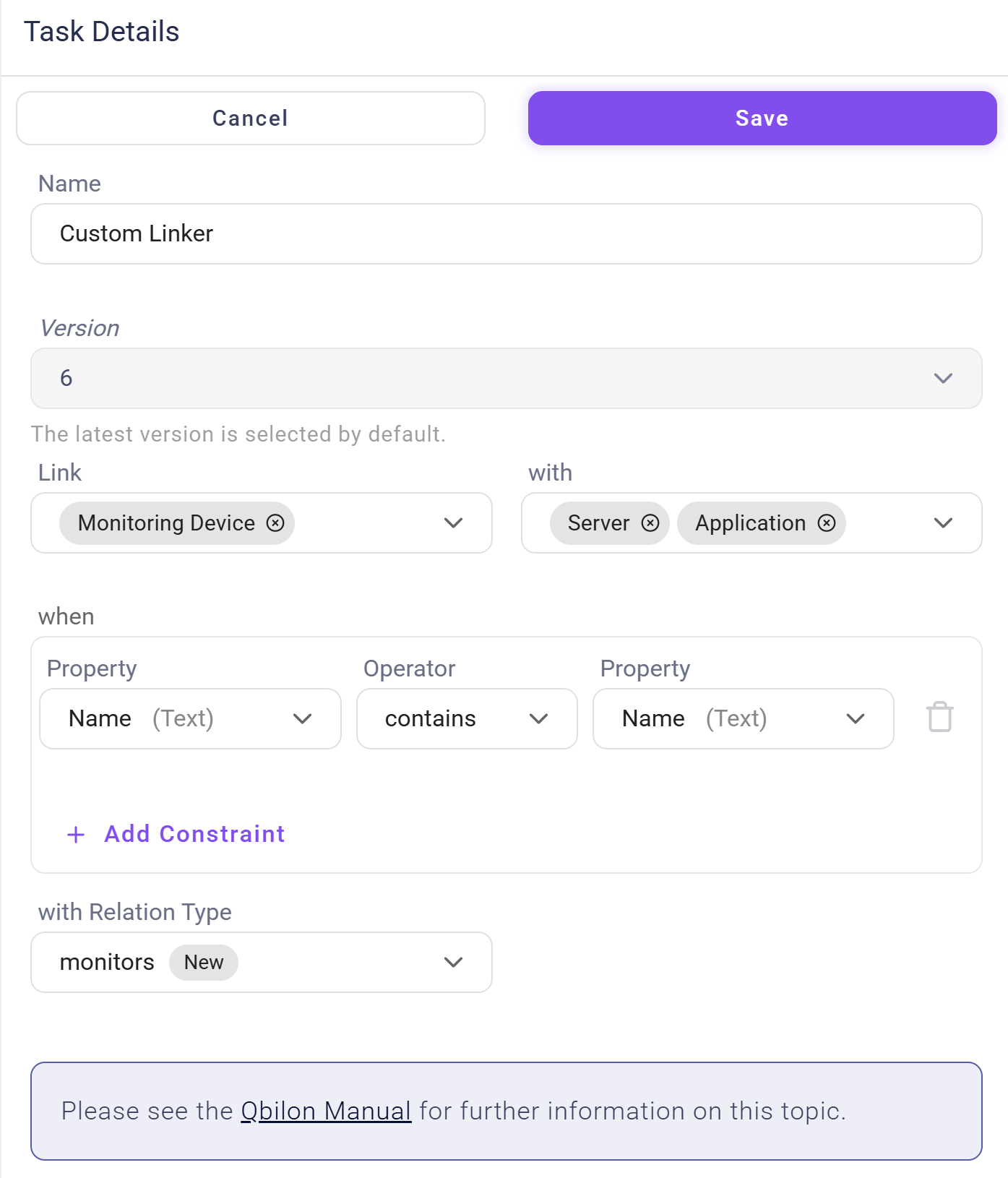
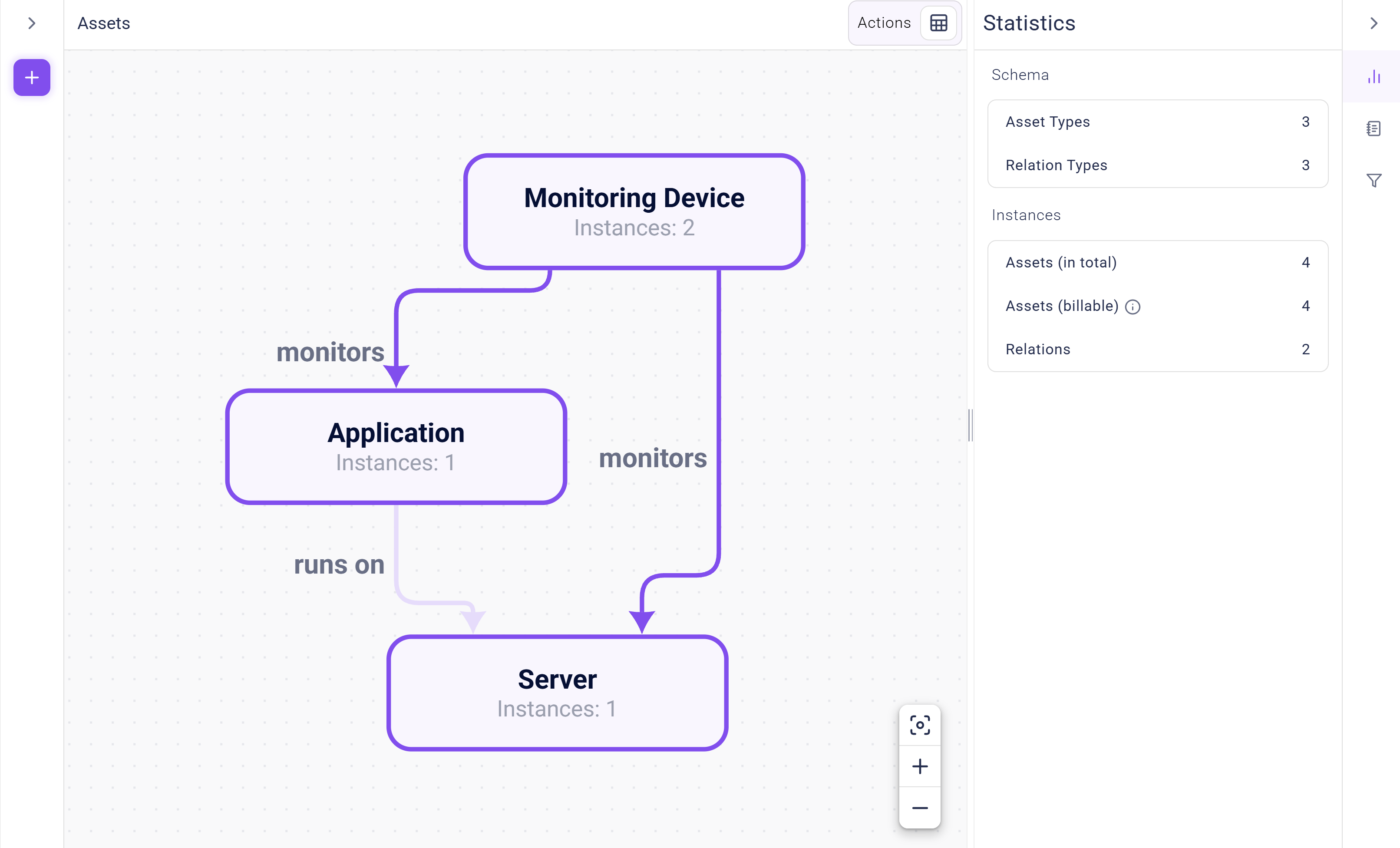
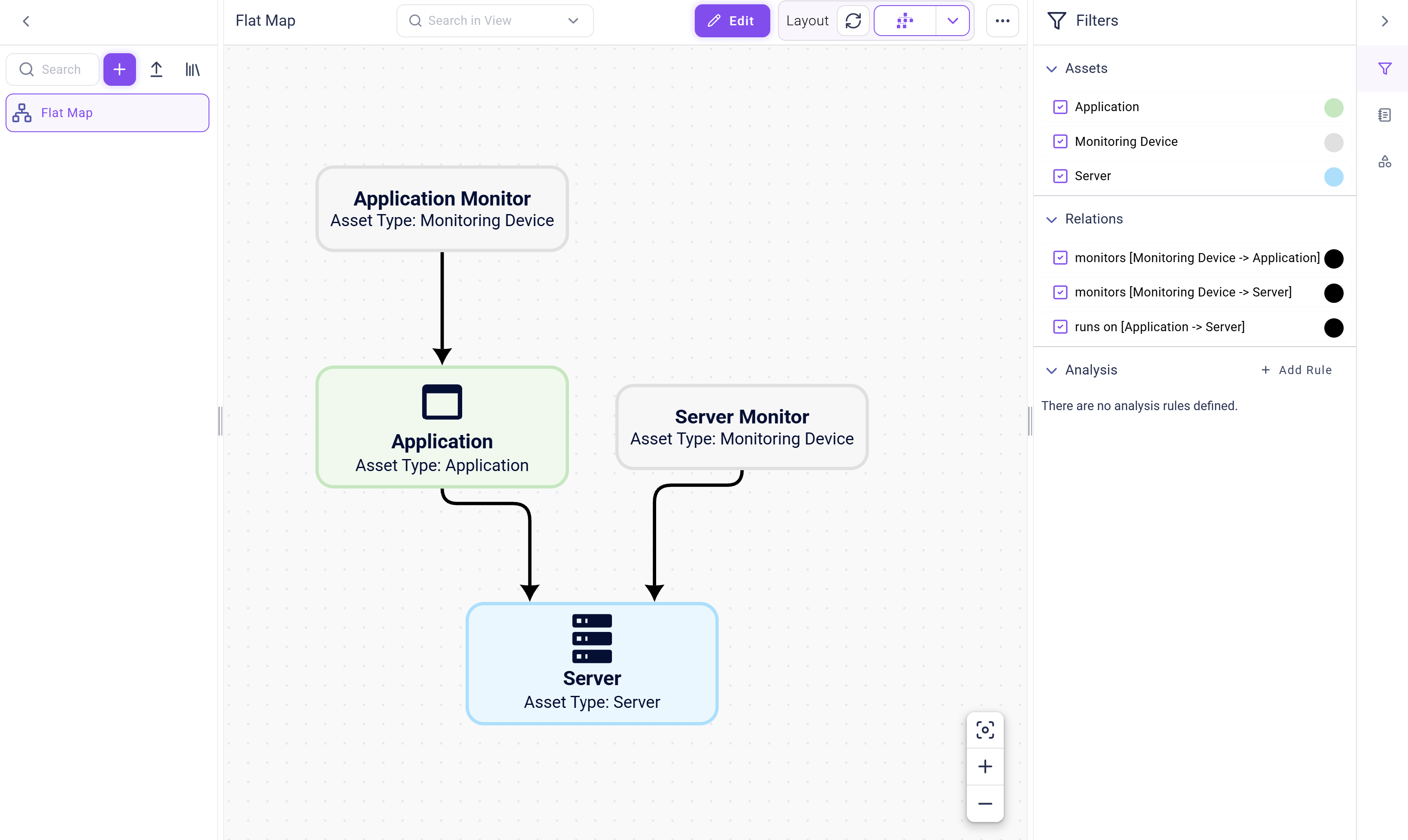
monitors between all Monitoring Devices and Application or Server when the value of the Asset property of a Monitoring Device is the same as the value of the Name property of an Application or Server. Luckily, the existing data contained perfectly matching values for both, and after running the linker task for the first time, your “Monitoring View” and data schema will have changed to the following:
- a prepared data source (see the respective section in Rest API) in whose name link requests are sent to Qbilon (this is the
taskIdpart in the URL), and - compliance with the data format as defined in Qbilon’s OpenAPI specification (see
<your qbilon host>/openapi/index.html).
Data Format
The full version of the JSON format for a linking action as described above would look like this:POST apiv1/data/link/-2 with valid credentials, then all instances of Monitoring Devices will be linked to any instance of Application or Server if the value of the respective Monitoring Device's Asset property is equal to the value of the Application/Server’s Name property.
The following is a step-by-step walk-through of the linking configuration to help you better understand what each part does and what the expected linking result will be.
Fields “typesA” and “typesB”
These two fields are arrays of types within Qbilon that shall be linked with each other. In order to not have to create “Custom Linkers” between each combination of types, you can provide more than one type in each of those fields. Qbilon will automatically go through all combinations and try to find suitable linking candidates depending on thelinkConditions provided.
Field “linkConditions”
ThelinkConditions field contains a list of comparing conditions and a booleanOperator that tells how the comparing conditions should be evaluated.
All comparing conditions in the conditions array have to be in the form:
attributeNameA/attributeNameB fields should refer to an existing attribute of the types being compared. If the attribute does not exist, the condition is evaluated as false. The datatype of each attribute must be one of those allowed in Qbilon, i.e., Boolean, Text, Number , DateTime or List<Boolean|Text|Number|DateTime>.
The allowed operators depend on the combination of datatypes of the attributes used for the comparison:
The last field
conditionDiscriminator is mandatory and must be simpledoubleattributenamecondition. This may change in a later version of the data format.
Field “linkConnection”
ThelinkConnection field defines the type of the newly created relations, i.e., if the linker detects two assets for which it should create a new relation, the relationName is the type of the relation to be created. If a relation with the given name already exists in Qbilon, no new relation type is created and only the relation instance is created. If no such relation exists, the linker creates the relation type first and then the relation itself.
Field “nameAttribute”
ThenameAttribute field defines which attribute of the newly created relation should be used as display name for this relation, i.e., which property should be used for the name in a diagram or table view.
Linking Behavior in Practice
In the following, we will go through several real-life cases that a linker might encounter and examine how the linker behaves during these cases to help you better understand the expected results of a custom linker.Repeated Run Without New Data
In the above case, where we have created 4 assets, i.e., 2xMonitoring Device, 1x Application and 1x Server, and have successfully linked them, you would now have exactly 3 relations. 2 of them were created by the call to the Linker API, i.e., the relations between the Monitoring Device and their respectively monitored Application or Server.
If you were to run the same linker again, it would internally find the same linking pairs, but it would not create any additional relations, because there is already a relation of type monitors existing between the respective assets. A linker will always only create exactly one relation of the given type between two assets that it has detected as viable linking candidates.
Repeated Run With New Data
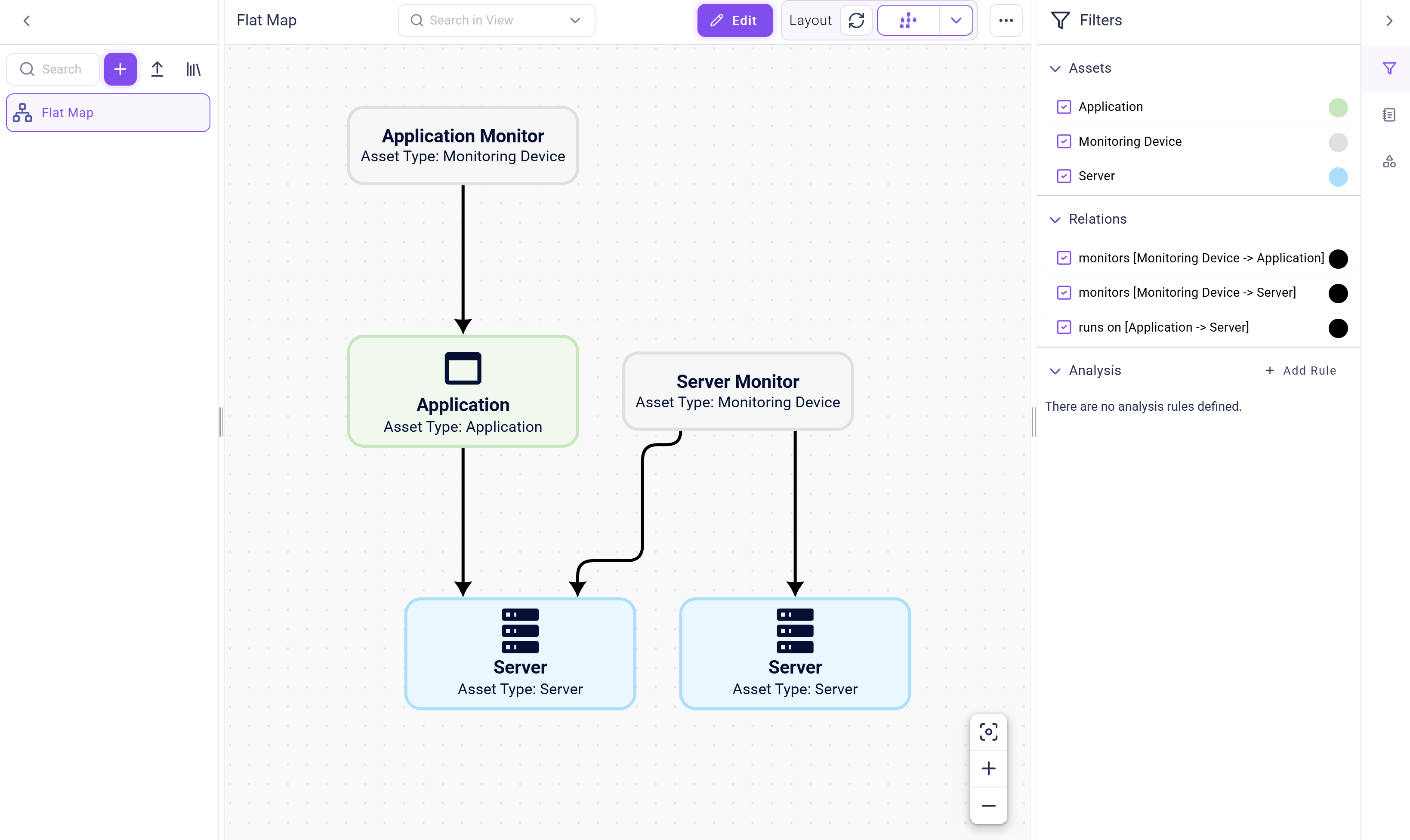
In contrast to the above case, where no new data was added to the scenario, consider a case where you have added an additionalServer (asset type) which is also named Server (instance name), and as such would be a viable link candidate for the Server Monitor from the above example.
When the linker is run again, it detects the new data and creates an additional link between Server Monitor and the additional Server 1, as shown in the figure below:
Self-Reflective Relations
When a linker is run, it basically creates all possible combinations of assets oftypesA and typesB, and then evaluates the linkConditions on all these combinations. If the combinations match, then it will create a relation between the two assets if there is not already one of the same relation.
However, there is the case where you could configure a linker that has the potential to create a lot of self-reflective relations, i.e., relations that are not between two different assets, but start and end at the same asset. For example, you could create a linker configuration like this:
Server Monitor and one from and to Application Monitor. However, in reality, Qbilon will not create a relation when you run this linking configuration. Qbilon currently doesn’t allow to create self-reflective relations from a linking configuration. This may change with a future version of the link data format.